Open Page Node
Browser NodeNavigate to a URL and load a web page
Overview
The Open Page node is typically the first node in a browser automation workflow. It launches a browser instance and navigates to the specified URL. This node must be used before any other browser interaction nodes.
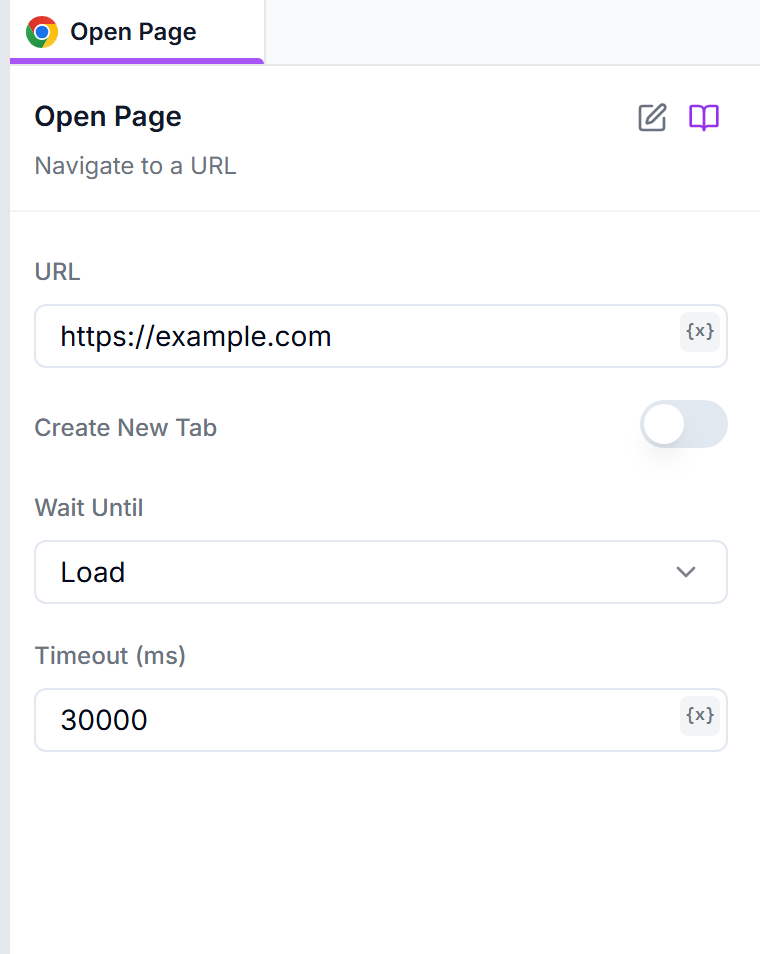
urlThe URL to navigate to. Must include the protocol (http:// or https://)
https://example.comcreateNewTabIf Chrome is already open, open the URL in a new tab instead of reusing the current one. If Chrome isn't open yet, it launches and uses the first tab.
falsewaitUntilWhen to consider navigation successful: 'load', 'domcontentloaded', or 'networkidle'
loadtimeoutMaximum time in milliseconds to wait for navigation to complete
30000Wait Until Options
domcontentloaded (Recommended)
Waits until the DOM is fully loaded and parsed. This is usually the fastest option and works for most cases.
load (Default)
Waits until the page is fully loaded, including all images, stylesheets, and scripts. Slower but more complete.
networkidle
Waits until there are no network connections for at least 500ms. Useful for pages with heavy JavaScript.
Examples
https://www.example.comhttps://www.google.comhttps://app.example.com/dashboardBest Practices
Tip: Always Include Protocol
Tip: Use domcontentloaded for Speed
Troubleshooting
Navigation Timeout
The page took too long to load.
- Increase the timeout value
- Use a faster waitUntil option like 'domcontentloaded'
- Check if the URL is accessible
- Verify your internet connection
Invalid URL Error
The URL format is incorrect.
- Ensure the URL includes http:// or https://
- Check for typos in the URL
- Remove trailing spaces
Browser Won't Launch
The browser instance fails to start.
- Make sure Prompteryx Desktop is running
- Check if another browser instance is already open
- Restart Prompteryx Desktop