Plans, credits and top-ups
Start with a free trial, then choose a monthly plan. AI credits pay for the models; packs and pay as you go top you up.
How it is paid for
- AI credits pay for every model: chat replies, images, video, audio, documents and each step of the AI Browser Agent. Each model is charged at its provider's price, so a quick answer costs a fraction of a credit and a long video costs more. A credit is worth $0.02.
- Cloud browser hours pay for time in a cloud browser. Runs in your own Chrome use free local minutes.
- Smaller allowances cover workflow executions, residential proxy data, automatic CAPTCHA solving and Connect Hub actions.
Your balance is shown in the sidebar and includes any promotional credits. Usage (in the account menu, or Settings → Usage) shows what each feature used.
Plans
The trial needs no card. When it ends you choose a plan to carry on. Paid plans are billed monthly. You can cancel any time. If you are a consumer in the UK or EU, you can also withdraw within 14 days of subscribing and get your money back, minus a proportionate amount for the days of service you used. Full details are on the pricing page.
Choosing or changing a plan
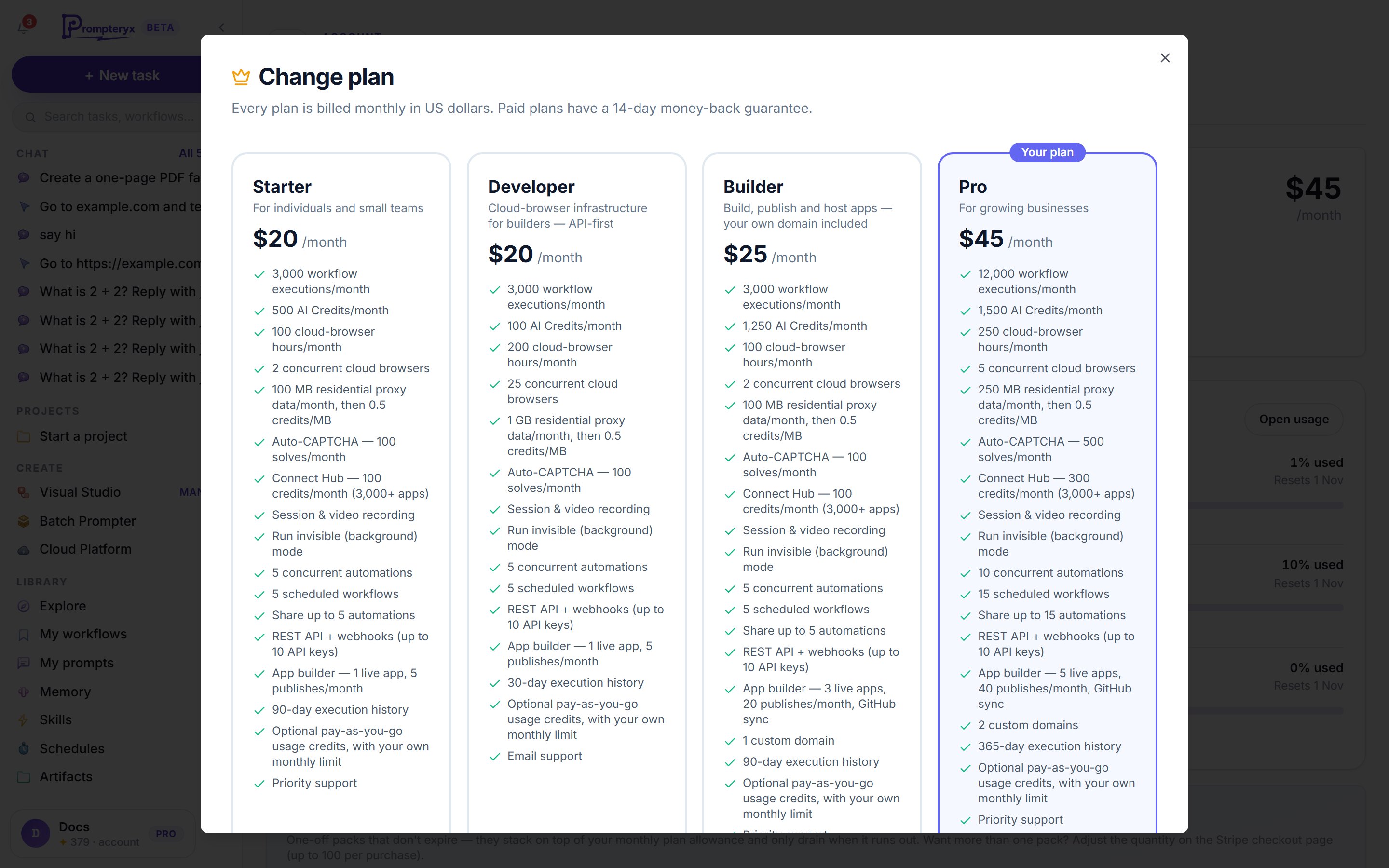
Open Subscription from your account menu and press the button to choose or change your plan. Every plan is listed with yours marked Your plan. Pick one and a confirm step tells you exactly what happens to your bill before anything is charged:
- From the trial: Continue to checkout takes you to a secure Stripe checkout.
- Upgrade: you pay today for the new plan, minus the unused part of the old one.
- Switch to a plan at the same price: nothing is charged today.
- Downgrade: Continue to Stripe opens Stripe's billing page to make the change.
- Enterprise: Contact sales.
Billing & invoices on the same page opens Stripe's billing page for your card, invoices and cancelling.
Top-up packs
Need more this month without changing plan? Buy a one-off pack from the plan picker (Or top up without changing plan) or from Top up credits when you run low.
Usage credits: pay as you go
On a paid plan you can turn on Usage credits — pay as you go on the Subscription page, so you never run out in the middle of something. When your AI credits fall below the level you set, your card is charged the reload amount and the credits are added straight away, at $0.02 a credit.
- Monthly spend limit: the most it will charge in a month. It is a hard stop, and you are told when you reach 50%, 80% and 100% of it.
- Reload amount and Reload when credits fall below: how much to add, and when.
- Reload now adds credits once, straight away. Add card / Change card sets the card it uses.
It is off until you turn it on.
Refer a friend
Open Subscription from your account menu. The Refer a friend card has your referral link (prompteryx.ai/r/…) to copy and share, and shows who has signed up with it. Your friend can also type your code in Have a referral code? when they sign up. You can refer people during your trial too.
- Your friend gets 250 AI credits and 25 cloud browser hours when their first plan payment goes through.
- You get 500 AI credits and 50 cloud browser hours 30 days after that payment, as long as it wasn't refunded and their plan is still active and not cancelled.
- Up to 10 rewarded referrals a month and 50 in total. Referral credits can be used while you have an active plan or trial.
Before Prompteryx opens: the waitlist
Prompteryx is getting ready to open to everyone. Until then, the sign-up buttons on our website say Join the waitlist: you can create your account, and we e-mail you when Prompteryx opens. The free trial starts when your account is let in, not before, and plans can't be bought while you are on the waitlist.
When you run out
When you run out of credits, the app tells you and offers Top up credits, Upgrade plan or Not now. To cap a single AI Browser Agent run, set Max credits for this run in its More settings (see AI Browser Agent in the chat).