Set Variable
Data NodeSave a value under a name so later steps can reuse it
Overview
The Set Variable node stores a value under a name you choose. Once set, any step further down the workflow can reference it with {{ variableName }}. Use it to remember a result, build a value from earlier steps, or keep your workflow tidy by naming the things you reuse.
How to use a variable later
After setting a variable named
email, use {{ email }} anywhere a field accepts variables.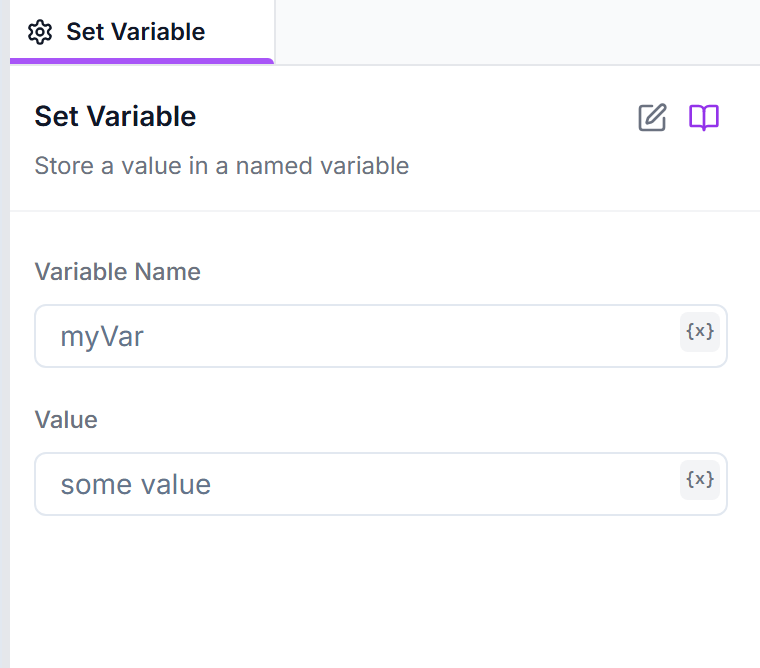
Parameters
Configuration options for this node
Variable NameText Input
Required
The name you'll use to reference this value later. Keep it short and clear, with no spaces.
Example:
customerEmailValueText Input
Required
What to store. Can be plain text, a number, or built from other variables using {{ }} syntax.
Example:
{{ row.Email }}Usage Example
Build a greeting once, reuse it everywhere
Combine values into a friendly message
Variable Name:
greetingValue:
Hi {{ row.Name }}, thanks for signing up!Later, drop
{{ greeting }} into an email or message node.Best Practices
Tip: Name things you reuse
If the same value shows up in several steps, set it once as a variable. Then you only have to change it in one place.
Tip: Remembering between runs
Set Variable lasts for the current run only. To remember something for the next run — like which items you've already seen — use the Data Store node instead.